

04. Global Core AI, Prompt Polish, Handoff & Checkpoints
Essential global Core AI hub, in-place AI Prompt Polish with undo, context handoff/fork/side-chat/send-context, and clean Git-ref checkpoints with rollback.
This chapter covers Herdr2’s most essential intelligence and engineering safety features: the Global Core AI Hub (essential setup), an in-depth guide to AI Prompt Polish, Context Handoff / Fork / Side-chat / Send Context, and zero-pollution Checkpoints & One-Click Rollback backed by hidden Git refs.
1. Global Core AI Assistant: The Essential Hub of Herdr2
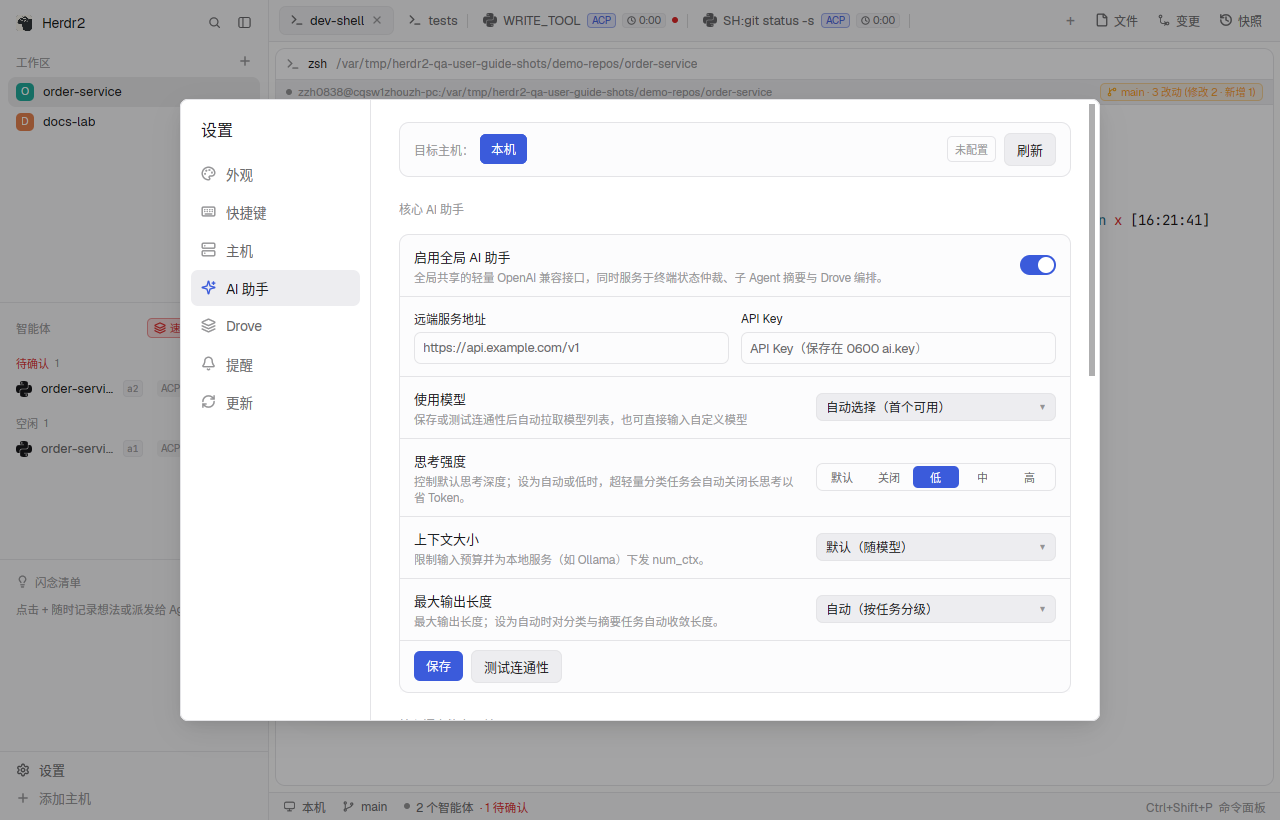
Section titled “1. Global Core AI Assistant: The Essential Hub of Herdr2”Press Ctrl+, to open Settings and switch to AI Assistant in the left sidebar to configure it (you can also set it up directly in the first-run welcome wizard):
1.1 One-Minute Setup
Section titled “1.1 One-Minute Setup”- Toggle on Enable Global AI Assistant (supports independent configuration for the local machine and each connected SSH remote host).
- Enter any OpenAI-compatible API endpoint and API Key:
- Recommended (great value, fast response): Official DeepSeek API (set Service URL to
https://api.deepseek.com/v1and model todeepseek-chat). - Also supported: Any OpenAI-compatible proxy / internal enterprise model gateway, or a fully offline local Ollama / vLLM instance (such as
http://127.0.0.1:11434/v1). - Privacy & Security: Your API Key is stored separately in a local
ai.keyfile with0600permissions (never written to plaintext config). You can also enable auto-redaction before sending, which automatically replaces API keys, Bearer tokens, PEM private keys, and URL credentials with<REDACTED>before transmitting terminal logs, diffs, or conversation snippets.
- Recommended (great value, fast response): Official DeepSeek API (set Service URL to
- Click Test Connection and then Save—Herdr2 will automatically fetch the list of available models.
- We recommend keeping Thinking Effort at
LoworDefault: Herdr2 automatically minimizes reasoning latency for high-frequency lightweight tasks like terminal state classification and prompt polishing, balancing sub-second responsiveness with minimal token cost.
1.2 Seven Core Capabilities Unlocked by Core AI
Section titled “1.2 Seven Core Capabilities Unlocked by Core AI”| Core Capability | How to Trigger | Pain Point Solved |
|---|---|---|
| ✨ AI Prompt Polish (High-Frequency Essential) | Ctrl+Alt+P (macOS Cmd+Alt+P) or click Polish Input / Polish; supports Ctrl+Alt+U undo |
Uses current session context to rewrite fragmented shorthand into a well-structured, constraint-aware engineering prompt—even replacing text in-place inside native CLI terminals! |
| Non-Protocol CLI State Arbitration | Runs silently in the background | When a CLI tool inside a terminal goes quiet without protocol reporting, automatically detects whether it is waiting on a permission prompt, errored out, or still thinking, accurately lighting up the sidebar badge |
| One-Click Git Commit Message Generation | Click AI Generate at the bottom of the right-hand Changes panel | Reads the actual workspace Git diff and drafts a clean, accurate commit message |
| Handoff/Fork Smart Recommendation & Summary | Click AI Recommend at the top right of the Handoff dialog | Analyzes recent conversation turns and code changes to recommend the best target agent and transfer mode, and generates a compact handoff bundle |
| Semantic Agent Titles & Progress Summaries | Runs silently in the background | Generates glanceable semantic titles and concise progress summaries for the left-hand agent list and top tabs |
| Catch-up Briefing | Run agent.briefing from the Command Palette |
After stepping away from your desk, summarizes all pending approval blockers, completed tasks, and batch-approval suggestions in one click |
| Checkpoint Bisection & Drove Assistance | Click Locate Fault in Checkpoints / AI One-Click Setup in Settings → Drove | Pinpoints the culprit turn that introduced a bug using natural language, and automatically matches models to Drove roles while diagnosing dead loops and conflicts |
2. Deep Dive: AI Prompt Polish
Section titled “2. Deep Dive: AI Prompt Polish”When collaborating with AI coding tools, writing a prompt with complete context, clear constraints, and explicit output boundaries can raise first-try success rates from 40% to 90%—yet during fast-paced coding, nobody wants to manually type out a structured specification every single time.
Herdr2’s Prompt Polish (prompt.polish) is the killer high-frequency feature built for exactly this: type your roughest shorthand draft, hit a shortcut, and let lightweight Core AI expand it into a crisp engineering instruction grounded in your project’s live context.
2.1 Why It Beats Copying Into a Web Chat to Rewrite
Section titled “2.1 Why It Beats Copying Into a Web Chat to Rewrite”- Built-in live context awareness, not just text rephrasing:
When triggered, Core AI automatically reads the session’s working directory (
cwd), recent conversation turns, recent tool outputs, and the tail of the native CLI terminal screen. Even if you only type a vague half-sentence (such as “fix that error from earlier and add edge-case tests”), it resolves the exact error and file paths from context instead of guessing. - In-place polishing inside native CLI terminals—zero copy-paste, zero context switching:
This is one of Herdr2’s most distinctive capabilities: even while typing inside a native PTY terminal like Claude Code, Codex, or Gemini, you never have to leave the terminal!
Press the shortcut, and Herdr2 reads the unsent draft directly from the CLI input box (with full support for multi-line input and numbered lists), displays a lightweight floating progress bar at the bottom of the window (cancellable at any time), and replaces the draft in-place once ready—just review it and press Enter to send!
If you keep typing before the polish request finishes, Herdr2 automatically detects the input change and cancels the overwrite, ensuring your latest keystrokes are never lost.
- One-second lossless Undo:
Feel the polished version is too verbose or prefer your original wording? Press
Ctrl+Alt+U(macOSCmd+Alt+U) or click the undo button in the top-right notification (prompt.polish_undo) to restore your exact original draft untouched.
2.2 Trigger Methods Across Every Surface
Section titled “2.2 Trigger Methods Across Every Surface”| Surface | How to Trigger | Best For |
|---|---|---|
| Native CLI Agent Terminal (Claude Code / Codex / Gemini, etc.) | Click ✨ Polish Input in the card header, or press Ctrl+Alt+P (macOS Cmd+Alt+P) |
Everyday coding—polish unsent terminal drafts in-place |
| Headless ACP Chat Box | Click ✨ Polish at the bottom right of the input box, or press Ctrl+Alt+P |
Structuring requirements quickly before dispatching complex coding, review, or research tasks |
| Flash Notes & Modal Inputs | Click the polish button beside the input box, or press Ctrl+Alt+P |
Turning a quick one-line note into a ready-to-dispatch task description |
| CLI / Automation Scripts | Run h2 ai polish-prompt "your rough draft" |
Invoking the same Core AI polishing engine on demand from external scripts or terminals |
2.3 Real-World Before / After Comparison
Section titled “2.3 Real-World Before / After Comparison”Suppose you just had Claude Code update src/pricing.py in order-service, and now you want it to add edge-case handling and unit tests:
- Your quick rough draft (3 seconds to type):
make pricing coupon codes case-insensitive, don't let negative amounts break the math, add unit tests and make sure they pass
- After pressing
Ctrl+Alt+Pin-place (about 1–2 seconds):Please update `apply_coupon` and the amount calculation logic in `src/pricing.py`, and add corresponding unit tests:1. Normalize coupon codes with `strip().upper()` before matching to handle leading/trailing whitespace and mixed-case input;2. Add defensive validation for negative `subtotal_cents` or invalid quantities so discounts never produce invalid totals;3. Add boundary test cases in `tests/test_pricing.py` covering lowercase/whitespace-padded coupon codes and invalid amounts, then run `python3 -m unittest` to verify all tests pass. - Too long and want your original back? Press
Ctrl+Alt+Uto revert in one click.
3. Context Handoff, Session Fork, Side-chat & Send Context
Section titled “3. Context Handoff, Session Fork, Side-chat & Send Context”During deep development work, four recurring friction points come up constantly:
- Your current agent conversation is getting long, approaching its context limit, or running out of quota—you want another model/tool to pick up the work without re-explaining the entire background.
- Midway through a task, you see two possible designs and want to try Option A and Option B separately without disturbing the main session.
- You want to ask a few conceptual questions about a newly generated piece of code without polluting your main task’s context window.
- You already have multiple live agents running (for example, a backend agent just updated an API while a frontend agent is waiting on the new fields, or Session A found a root cause you want to pass to Session B, which is actively coding)—you don’t want to spawn a brand-new session; you just want to hand the latest context straight over.
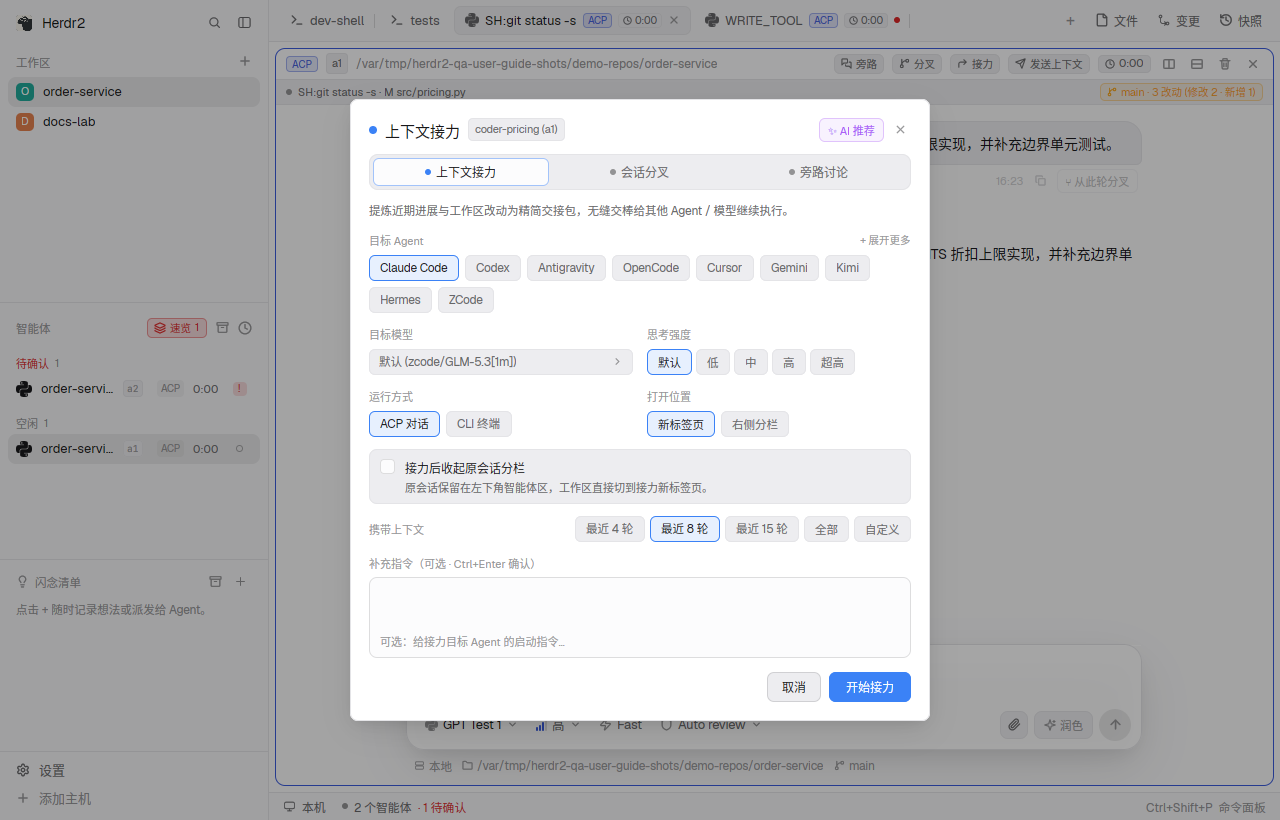
Click Side-chat / Fork / Handoff / Send Context at the top of any ACP conversation or terminal (or run herdr2 do agent.handoff) to open the context transfer dialog:
3.1 Comparing the Four Modes
Section titled “3.1 Comparing the Four Modes”| Mode | Target Session | What It Does | Typical Use Cases |
|---|---|---|---|
| Handoff | New session | Distills recent conversation progress + current Git workspace changes into a compact handoff bundle for any new agent/model to continue seamlessly | Finish architecture design in Claude, then hand off to Codex for low-level implementation; or “slim down and restart” an overly long thread |
| Fork | New parallel session | Copies context from the current turn (or click Fork from this turn beneath any historical message) to launch a parallel branch, optionally auto-creating an isolated Git Worktree | Explore two refactoring approaches in parallel; or keep the mainline intact while running bold experiments in a fork |
| Side-chat | Right-hand read-only sidebar | Opens a lightweight read-only discussion in the right panel (alongside Files / Changes / Checkpoints) sharing a background summary without polluting main session history or modifying code | Ask “Could this lock ordering deadlock?” while reading code, then close when done (or Merge Back to Parent to inject conclusions) |
| Send Context | Existing live session (CLI or ACP) | Sends a packaged summary of recent context directly to another already-running live agent without creating a new session, optionally with a note or follow-up instruction | Pass updated API contracts from a backend agent straight to a running frontend agent; or sync research/debugging findings to an active coding session (works across workspaces) |
3.2 Fine-Grained Controls in the Dialog
Section titled “3.2 Fine-Grained Controls in the Dialog”- Handoff / Fork / Side-chat (new target):
- Target Agent & Model: Freely switch across all 14 built-in presets; click AI Recommend at the top right to let Core AI suggest the best-fit agent and transfer mode for the current task.
- Runtime Mode & Placement: Choose to launch as an
ACP ChatorCLI Terminal, and open in aNew TaborRight Split. - Collapse Original Split After Handoff: When checked, the original session tucks away into the bottom-left agent list as an archive, and your workspace focuses immediately on the newly handed-off session.
- Send Context (deliver to an existing session):
- Select Target Live Agent: Automatically lists all currently active CLI terminals and ACP sessions (showing live status dots, type badges, and workspace names; supports cross-workspace delivery).
- Context Scope & Note: Trim precisely to
Last 4 turns,Last 8 turns,Last 15 turns,All, or aCustom turn range, attach an optional note or follow-up prompt at the bottom, and choose whether to jump focus straight to the target session after sending.
- Closing the Loop on Forks & Side-chats — Merge Back to Parent:
- Click Merge Back to Parent at the top of a forked or side-chat session to automatically distill your findings and inject them back into the original parent session. If the fork used an isolated Git Worktree, you can also check “Notify main agent to merge the Worktree branch code (keeping the Worktree and branch)”.
3.3 One-Line CLI Equivalents
Section titled “3.3 One-Line CLI Equivalents”# 1. Context Handoff: hand off a1's last 8 turns to codex and continue in a new sessionh2 handoff a1 --preset codex --recent-turns 8 --prompt "Add integration tests covering the current changes"
# 2. Session Fork: fork a1 inside an isolated Git Worktree so workspace files don't collideh2 handoff a1 --kind fork --worktree --prompt "Try rewriting the discount calculator as a state machine"
# 3. Send Context: forward a1's last 6 turns directly into another live session (CLI t2 or ACP a2)h2 handoff a1 --kind send-context --into t2 --recent-turns 6 \ --note "Backend added the NEW10 coupon code and validation error codes" \ --prompt "Update the frontend checkout page to match the latest backend API contract"4. Checkpoints & One-Click Rollback
Section titled “4. Checkpoints & One-Click Rollback”When letting AI edit code directly, the scariest scenario isn’t a single bad edit—it’s realizing three turns later that Turn 1 introduced a subtle bug, now tangled up with your own manual edits, leaving you afraid to run git reset --hard.
Herdr2 includes a built-in Checkpoints engine backed by hidden Git refs (refs/herdr2/...):
- Zero Git history pollution: All snapshots live strictly as hidden objects inside the Git object store—no temporary commits are created, and your
HEADand branch history remain completely untouched. - Automatic + manual dual-track snapshots: ACP agents automatically checkpoint after every editing turn; you can also click + Snapshot in the top right or run
h2 checkpoint snapanytime to bookmark the current workspace state.
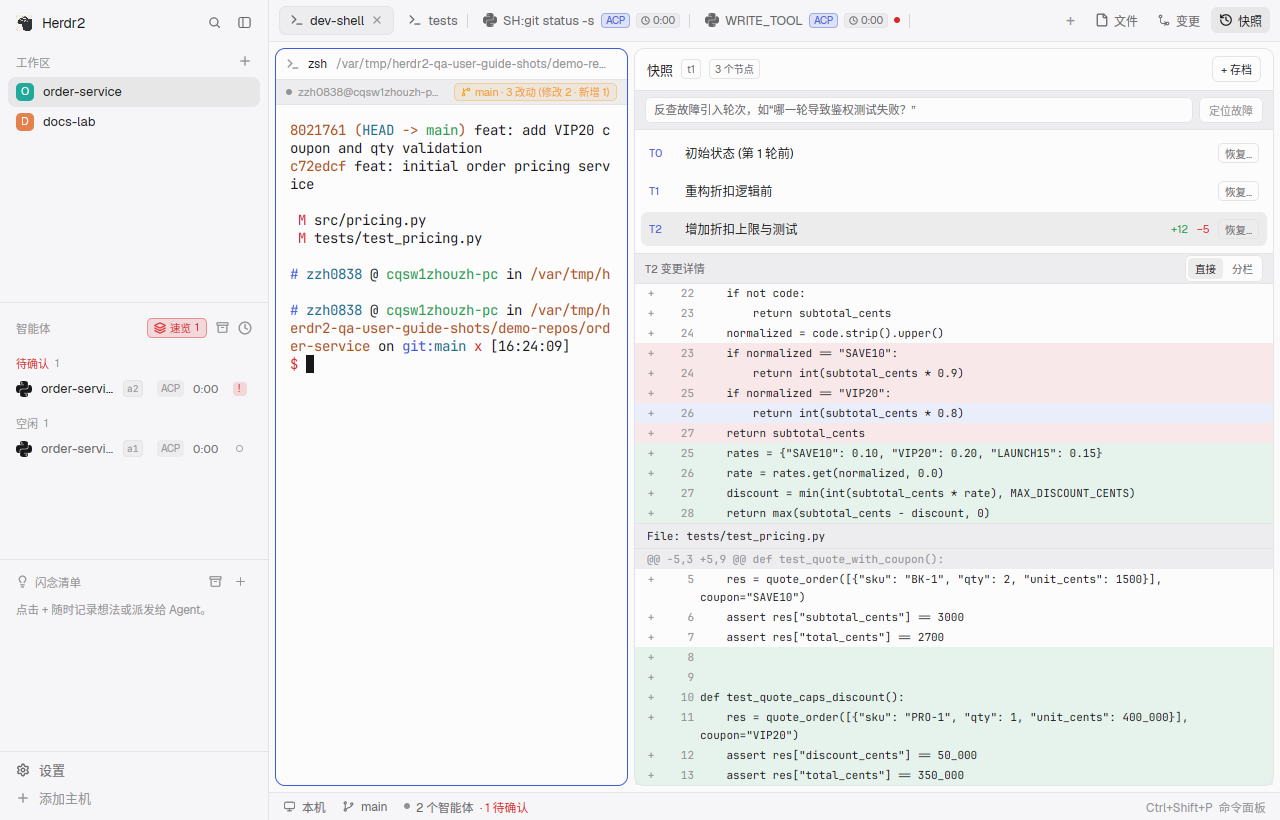
Click Checkpoints in the top-right corner of the main window to open the full turn timeline:
Core capabilities at a glance:
- Turn Timeline (
T0/T1/T2…): Clearly lists each snapshot’s bookmark label (e.g.,T1 Before refactoring discount logic,T2 Add discount cap and tests +12 -5). - Clean Per-Turn Diff: Click any node to immediately inspect the exact code delta introduced in that specific turn (supports toggling between
InlineandSplitdiff views), stripped of unrelated noise. - One-Click Rollback: Click Restore… to the right of any historical turn to either roll back conversation state only, or restore both conversation and workspace files to that turn’s exact state.
- Natural-Language Fault Bisection (Bisect): Describe the failure in the top search bar (e.g.,
Which turn broke the discount cap unit test?) and click Locate Fault—Herdr2 combines Core AI with each turn’s clean diff to narrow down the exact culprit turn.
Corresponding h2 checkpoint CLI Commands
Section titled “Corresponding h2 checkpoint CLI Commands”# Manually take a labeled snapshot for the current terminal/agenth2 checkpoint snap t1 --label "Before refactoring discount logic"
# List all turn checkpointsh2 checkpoint ls t1
# Inspect the clean diff between any two turnsh2 checkpoint diff t1 --from 1 --to 2
# One-click rollback to Turn 1 (including workspace files)h2 checkpoint rollback t1 --turn 1 --workspace
# Run fault-turn bisection from the CLIh2 checkpoint bisect t1 --symptom "VIP20 discount cap unit test failed"Previous: ← 03. Headless ACP Agents & Permission Control | Next: 05. Drove Multi-Agent DAG Orchestration →