

Herdr2 User Guide
Complete illustrated user guide and learning roadmap for Herdr2's dual-plane workbench and multi-agent orchestration runtime.
Welcome to the Herdr2 User Guide!
Herdr2 is a dual-plane workbench and agent orchestration runtime built for modern AI-assisted software engineering. It unifies real terminals (Ghostty/PTY), headless structured ACP agents, Git checkpoints & context handoffs, and a multi-agent DAG orchestration engine (Drove) inside a single high-performance native window backed by a persistent daemon (h2).
Herdr2 at a Glance
Section titled “Herdr2 at a Glance”- Close the window, keep everything running: Both terminals (
t*) and agents (a*) are hosted inside theh2background daemon. Restarting the window, upgrading the UI, or even dropping an SSH connection will never interrupt running builds or agent sessions. - Terminals and chats, each at its best: Use Ghostty real terminals (
t*) when you want native TUI feel, interactive shells, or Claude Code / Codex CLI; use headless ACP agents (a*) when you want structured conversations, inline permission approvals, and scriptable automation. - Global Core AI hub & Prompt Polish: A lightweight built-in global AI control plane powers in-place terminal Prompt Polish (
Ctrl+Alt+P), semantic CLI status detection, diff-based commit message generation, handoff summaries, and failure diagnosis—elevating everyday workflows end to end. - Portable context & reversible edits: Supports cross-agent / cross-model context Handoff and session Fork, plus per-turn Checkpoints stored under hidden Git refs for clean per-turn diffs and one-click rollback.
- From solo operator to agent swarm: Built-in single-daemon orchestrator Drove decomposes complex requirements into a directed acyclic graph (DAG) of tasks with dependencies, isolated worktrees, automated verification gates, and heterogeneous code reviews.
Guide Contents & Reading Path
Section titled “Guide Contents & Reading Path”| Chapter | Document | Core Topics | Best For |
|---|---|---|---|
| 01 | Installation, Quick Start & UI Tour | Multi-platform install, dual-plane architecture, essential Core AI Welcome wizard, 5 main UI regions, native CLI + Prompt Polish & ACP hands-on loop | All new users |
| 02 | Workspaces, Terminals & Code Panels | Spaces / Tabs / Splits, essential shortcuts, Ghostty real terminals & h2 hosting, Files / Changes / Checkpoints panels, Flash Notes |
Everyday developers |
| 03 | Headless ACP Agents & Permission Control | 14 built-in agent presets, desktop & CLI launch, structured chat view, serial Inbox & --steer, permission approvals, live model switching, built-in MCP & subagent tree |
AI-heavy coding workflows |
| 04 | Global Core AI, Prompt Polish, Handoff & Checkpoints | Essential Global Core AI setup, Spotlight: AI Prompt Polish (in-place CLI polish / undo / context-aware), Handoff / Fork / Side-chat / Send Context, hidden Git ref Checkpoints & failure diagnosis | All users (highly recommended) |
| 05 | Drove Multi-Agent DAG Orchestration | One-click desktop role setup, Plan first then /drove orchestrate, /drove-add live task injection, Review circuit breaker, Drove Web real-time DAG canvas |
Complex tasks & multi-agent collaboration |
| 06 | Remote Hosts, Deep Customization & Automated QA | Multi-machine SSH remote hosts, appearance / themes / 3 built-in layouts, hot-reloading Layouts & Mods, sandboxed AI-driven automated QA | Power users & contributors |
Core Concepts Cheat Sheet
Section titled “Core Concepts Cheat Sheet”| Term | Identifier / Location | Description |
|---|---|---|
h2 (herdr-core) |
Background daemon + CLI | Hosts all PTY terminals, headless ACP agents, checkpoints, the AI control plane, and the Drove orchestration engine. |
Herdr2 (herdr-app) |
Native desktop window (GPUI) | High-performance GPU desktop client for h2, providing Spaces, Tabs, Splits, code panels, and structured chat rendering. |
| Interactive Terminal | t1, t2, … |
Real PTY terminal hosted in a holder, GPU-rendered on desktop via libghostty-vt, and attachable or script-controllable at any time. |
| Headless ACP Agent | a1, a2, … |
Structured agent communicating via stdio JSON-RPC (ACP v1), with no PTY allocated and zero TERM* pollution. |
| Space (Workspace) | Top of left sidebar | An isolated working context scoped to a project directory (and host), containing multiple Tabs and Split Panes. |
| Checkpoint | Right-hand Checkpoints panel / h2 checkpoint |
Clean working-tree snapshot stored under hidden Git refs without touching your regular Git branches or commit history. |
| Drove | h2 drove / http://127.0.0.1:7799 |
Native multi-agent DAG orchestrator that dispatches multi-role Workers, enforces verification gates, and runs heterogeneous code reviews. |
Recommended Learning Path
Section titled “Recommended Learning Path”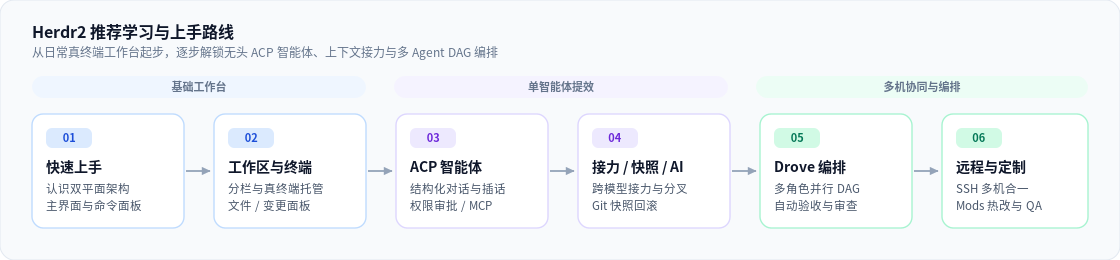
Ready to dive in? Start with Chapter 01: Installation, Quick Start & UI Tour.