

03. Headless ACP Agents & Permission Control
14 built-in ACP presets, structured conversations, serial Inbox & live --steer interruption, 4-tier permission policies, and built-in MCP subagent trees.
This chapter covers one of Herdr2’s signature capabilities: launching headless ACP agents, using the structured conversation view, mastering the serial Inbox and live interruption (
--steer), configuring fine-grained permission policies, and coordinating parent-child agent trees via built-in MCP.
1. What Is a Headless ACP Agent?
Section titled “1. What Is a Headless ACP Agent?”Herdr2 introduces a headless ACP (Agent Client Protocol v1) runtime:
- Pure structured NDJSON transport:
h2exchanges structured JSON-RPC messages with agents over stdio (text blocks, tool-call cards, image/file attachments, configuration options, permission requests)—allocating no PTY and injecting zeroTERM*environment variables, eliminating terminal escape-sequence corruption. - Dedicated addresses & state machine: Each headless agent gets its own address (
a1,a2, …) with a precise lifecycle state machine (starting→working/blocked/idle/done/exited). - 14 built-in agent presets out of the box:
| Preset | Tool / Ecosystem | Preset | Tool / Ecosystem |
|---|---|---|---|
claude |
Claude Code | codex |
OpenAI Codex |
agy |
Antigravity | gemini |
Gemini CLI |
cursor |
Cursor Agent | opencode |
OpenCode |
copilot |
GitHub Copilot CLI | kimi |
Kimi CLI |
qwen |
Qwen Code | pi |
Pi Agent |
hermes |
Hermes | dsh |
DSH |
glm |
GLM | zcode |
ZCode |
2. Two Ways to Launch: Desktop & CLI
Section titled “2. Two Ways to Launch: Desktop & CLI”Option A: One-Click Launch on Desktop
Section titled “Option A: One-Click Launch on Desktop”- Click
+on the right of the top Tab Bar (or pressCtrl+Alt+N), pick any installed agent preset from the menu, and launch it in ACP Chat mode. - You can also choose the initial model and Reasoning Effort right at launch.
Option B: Spawn via h2 run from the CLI or Scripts
Section titled “Option B: Spawn via h2 run from the CLI or Scripts”# Run a one-shot task in the foreground and print the final reply when finishedh2 run --agent claude --cwd /path/to/repo --prompt "Analyze the discount edge cases in src/pricing.py"
# Launch persistently in the background (recommended for parallel work); immediately returns an address like a1h2 run --bg --name coder-pricing --agent codex --cwd /path/to/repo \ --permissions approve-reads \ --prompt "Add unit tests for MAX_DISCOUNT_CENTS and make pytest pass"
# Inspect detailed agent state, latest reply, or wait for completionh2 get a1h2 read --last a1h2 wait a13. Inside the Structured ACP Chat View
Section titled “3. Inside the Structured ACP Chat View”Opening an ACP agent tab in the main workspace gives you a clean, structured conversation interface:
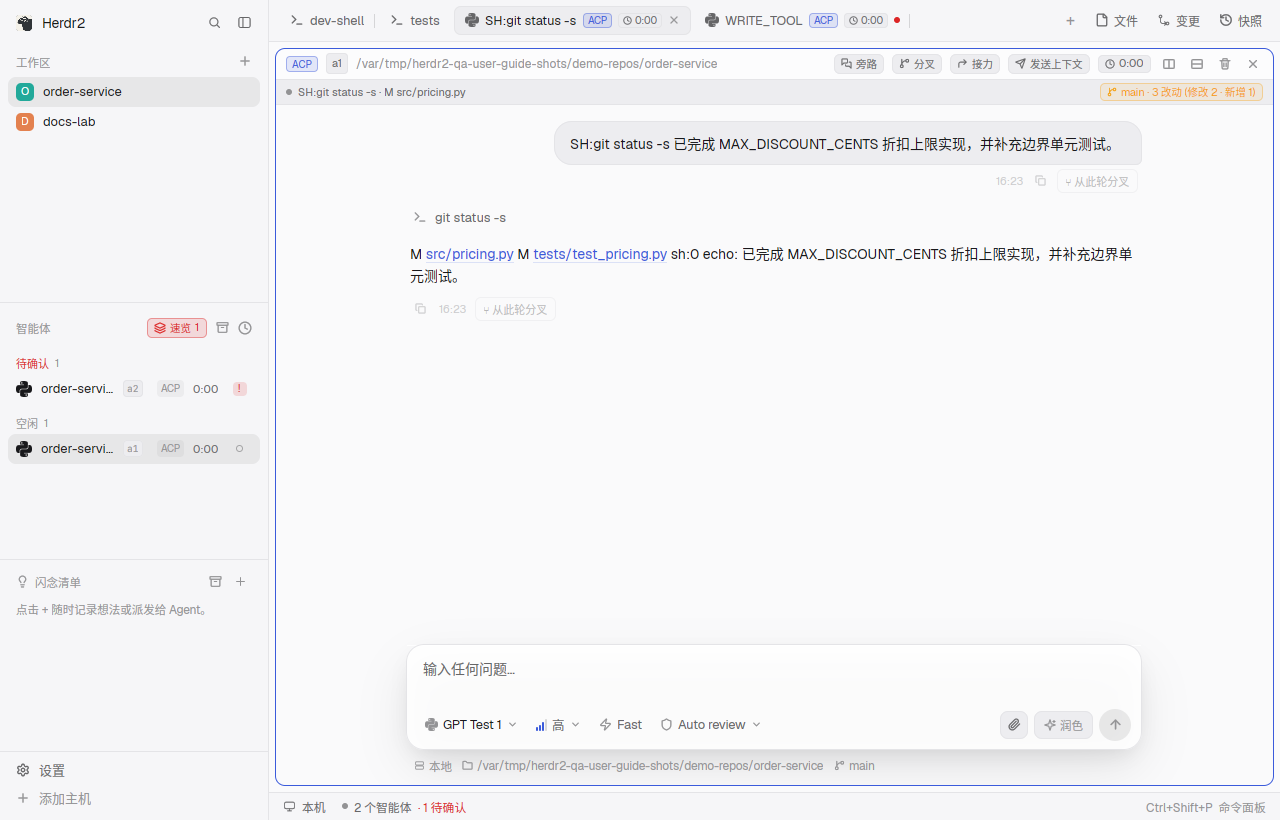
This screenshot highlights the 4 most-used interaction areas of the ACP view:
- Top session toolbar:
- The left displays the
ACPbadge, agent address (e.g.,a1), and working directory, with a live summary and Git branch change count right below. - The right provides four context collaboration actions—Side-chat (ask a quick follow-up without polluting the main thread), Fork (clone an independent branch from the current state), Handoff (pass the baton across agents or models), and Send Context—plus a timer, trash, and close buttons.
- The left displays the
- Structured message & tool-call stream:
- User prompts and agent responses are cleanly separated; tool executions (such as
>_ git status -sabove) render as collapsible cards, and file paths (such assrc/pricing.py) are clickable links that open directly in the right-hand Files panel. - Beneath every turn you get quick Copy and Fork from here buttons, letting you branch off from any earlier point in the conversation at any time.
- User prompts and agent responses are cleanly separated; tool executions (such as
- Rich bottom composer & live parameter bar:
- Without restarting the session, switch Model (e.g.,
GPT Test 1), Reasoning Effort (Low / Medium / High / Max), Fast mode, and Permission policy (Auto review / Plan / Bypass permissions) directly from the bottom-left selectors. - On the bottom-right, paste or attach images and files, or click Polish (
prompt.polish) to invoke Core AI and rewrite casual drafts into precise engineering prompts (with one-click undo).
- Without restarting the session, switch Model (e.g.,
- Bottom-left “Agents” monitor rail:
- Tracks every session’s live status, elapsed time, and blocked alerts in real time—so you never miss an agent waiting on your approval, even when focused on another tab.
Hot-Switching Config via CLI
Section titled “Hot-Switching Config via CLI”The exact same live configuration changes can be scripted with h2 config:
# List all adjustable config options supported by this agent (model, reasoning effort, mode, etc.)h2 config a1 --list
# Switch model, reasoning effort, and fast mode liveh2 config a1 --id model --value claude-sonnet-4-5h2 config a1 --id reasoning_effort --value highh2 config a1 --id fast-mode --bool true
4. Serial Inbox & Live Interruption (--steer)
Section titled “4. Serial Inbox & Live Interruption (--steer)”When an ACP agent is busy executing a long-running task (status working), you don’t have to sit idle waiting for it to finish before sending your next instruction:
- Default queueing (Serial Inbox): Simply send another message (from the desktop input box or via
h2 send a1 "Also check the README"). It automatically enters the agent’s serial Inbox; once the current turn finishes,h2delivers the next message in order, preventing concurrent state corruption. - Urgent interruption (
--steerpreemption): If you spot the agent heading in the wrong direction and need to cancel the current turn immediately and redirect it, run:
# Inspect queued messages in the agent's Inboxh2 inbox ls a1
# Cancel the active turn immediately and preempt with a new instructionh2 send --steer a1 "Hold on—don't change the function signature in pricing.py; keep it backward-compatible!"
5. Fine-Grained Permission Arbitration & Inline Approvals
Section titled “5. Fine-Grained Permission Arbitration & Inline Approvals”Clear safety boundaries matter whenever an AI autonomously edits code or runs commands. Herdr2 offers 4 configurable permission policies per ACP agent (set via --permissions at launch):
| Policy | Behavior | Best For |
|---|---|---|
approve-all |
Automatically approves all read, write, and execute requests | Isolated worktrees, trusted sandbox tasks |
approve-reads |
Automatically approves read-only operations; blocks and awaits human approval before writing files or running commands | Everyday local development (recommended default) |
ask |
Blocks and asks for approval on every tool call | High-sensitivity directories or trying a new tool |
deny-all |
Automatically rejects all tool calls requiring permission | Pure Q&A, read-only analysis, and security audits |
When an agent triggers an operation requiring human approval (for example, requesting to edit output.txt under approve-reads), it immediately enters the blocked state:
- Both the bottom-left Agents list and the top Tab Bar light up with a red Blocked alert.
- Opening the conversation reveals a prominent red-bordered inline approval card:
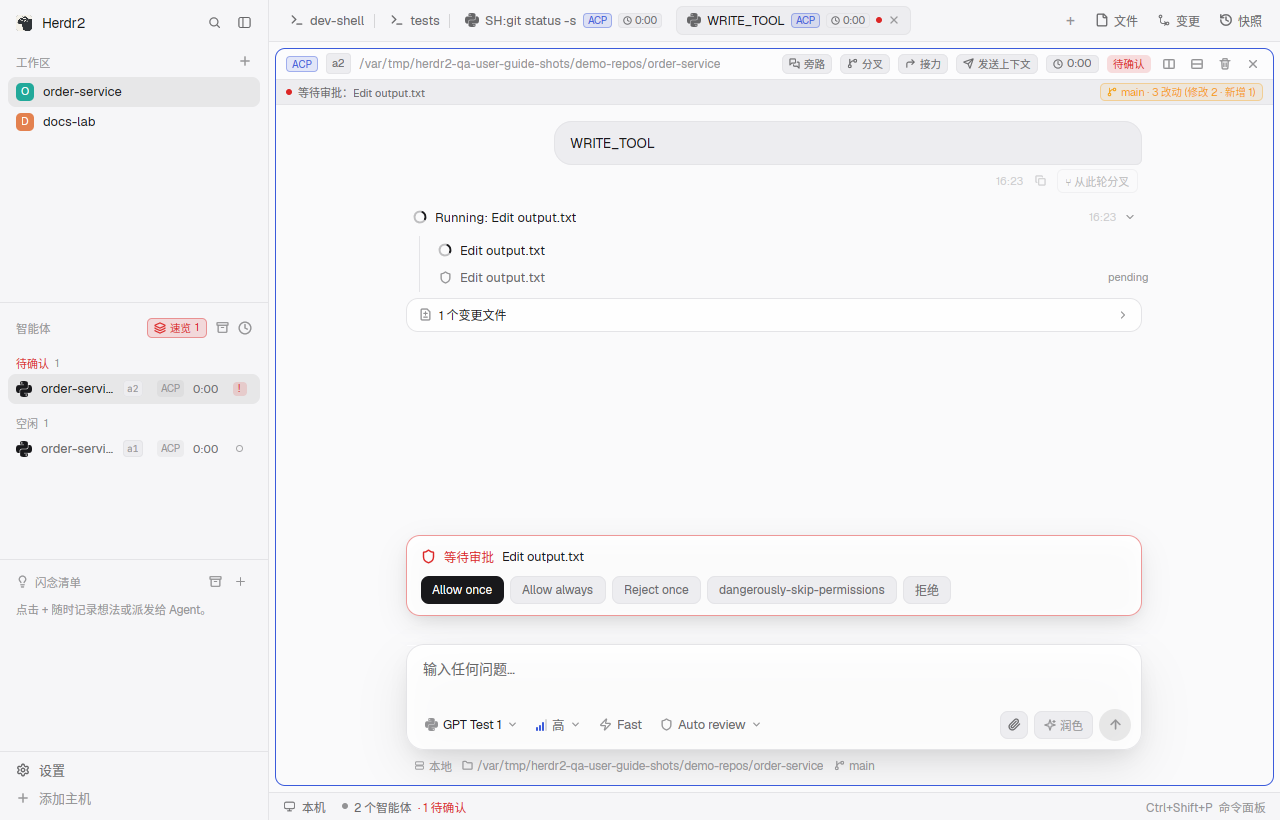
Choose your trust level with a single click:
Allow once: Permit only this single operation.Allow always: Auto-approve similar operations for the rest of this session.Reject once: Deny this tool call; the agent receives the rejection and tries an alternative approach.dangerously-skip-permissions: Switch the current session to full auto-approval.
You can also approve or deny remotely from the CLI (even over mobile SSH or from a parent agent script):
# Inspect details of the pending permission requesth2 get a2
# Approve or denyh2 approve a2h2 deny a2
6. Built-In MCP & Parent-Child Subagent Trees
Section titled “6. Built-In MCP & Parent-Child Subagent Trees”Herdr2 ships with a built-in standard MCP server: h2 mcp. When inject_mcp = true (enabled by default), every agent launched by h2 automatically receives a ready-to-use toolset for spawning and managing its own subagents:
| MCP Tool | Purpose |
|---|---|
h2_run |
Spawn a child ACP agent or background command, automatically recording the current session as its parent |
h2_send |
Send a message to a subagent (supports queueing or steer preemption) |
h2_wait |
Block until a subagent finishes its current turn or enters blocked |
h2_read |
Read a subagent’s latest response or terminal output |
h2_ls |
List active terminals and subagents in the current scope |
h2_approve / h2_deny |
Approve or deny tool permission requests on behalf of a subagent |
h2_handoff |
Handoff or fork context into a new subagent |
Previous: ← 02. Workspaces, Terminals & Code Panels | Next: 04. Global Core AI, Prompt Polish, Handoff & Checkpoints →